
Set Up Cleaning Scheduling and Billing
From a first clean to a return visit, keep the address, access details, crew assignment, and bill straight.
Published
On this page
A first deep clean takes a different amount of time from a routine visit, and neither should be booked solely from a customer’s billing address. Supplies and travel purchases also need a home in the books rather than a pile of loose receipts. Ask what rooms and tasks are in scope, whether someone will be home, and how the team can get in. Opsentric can track the request and the visits, but it is not a route optimizer or an automatic recurring-booking system.
Where cleaning bookings need more than a calendar
- A first deep clean is priced like a routine visit. Capture rooms, condition, exclusions, and unanswered questions in a lead before quoting. Proposals can distinguish the service options instead of hiding different scopes behind one booking title.
- The right team has the wrong home or date. Customer service locations and assigned Field Service visits give the dispatcher and cleaners a specific booking to check. Keep sensitive access credentials in a separate secure process.
- A regular arrangement is mistaken for a staffed appointment. Review the next visit and its assignees explicitly. Track the invoice separately so a completed clean does not hide an unpaid balance or imply that another visit is booked.
Set up your organization before booking the first clean
- Review business and financial details. Add your business name and customer-facing contact details, then review the country and choose Time zone. Confirm Organization currency, Starting number, and Padding width before creating the workspace; currency and invoice numbering cannot be changed later. Visit times follow the organization’s timezone.
- Assign office and cleaner responsibilities. Self Scheduling provides personal blocks; Basic or Pro with the Field Service add-on supports assigning cleaners to customer homes. Decide who can book visits, manage invoices, upload supply receipts, and review expenses. A cleaner does not need full ledger access to submit a receipt. See the first-workday checklist.
- Connect Stripe to accept customer credit cards. After organization creation, a user with settings-management access opens Administration → Payments and chooses Connect With Stripe when offered. Complete provider onboarding, check Accept customer payments and Receive bank payouts separately, choose an active Online payment income category, and select Save Income Category. This is separate from paying for Opsentric. Follow the Stripe setup guide before offering invoice checkout; a regular cleaning agreement does not authorize automatic card charges.
Capture scope before offering a slot
Add the household as a customer. When the work address differs from their mailing or billing address, add the right service location if your Field Service access allows it. Avoid storing door codes or other sensitive access credentials in broadly visible notes; arrange secure access instructions through your own process.
Create a Lead for a new cleaning request and set a follow-up to confirm the home size, requested tasks, and any exclusions. A one-time move-out clean may need a walkthrough before a fixed quote; a routine return visit may use the scope already agreed. The lead workflow records the next contact, not an automatic booking.
Ask whether this is a one-time clean, a first visit before a regular arrangement, or a return visit with a known scope. A move-out job may need a condition walk-through and a different time allowance from an ordinary clean. Capture the customer’s answer in the lead and follow up on anything still unclear, such as which rooms are excluded or whether supplies are provided. Do not turn a customer’s hope for a weekly slot into a series of appointments you have not staffed.
If a household has two properties, keep the contact under one customer and confirm the exact home for each visit. Record only operational details the team should see. A schedule block’s title and notes can be visible within the organization, so use a separate secure process for access codes and private instructions.
Choose personal planning or team dispatch
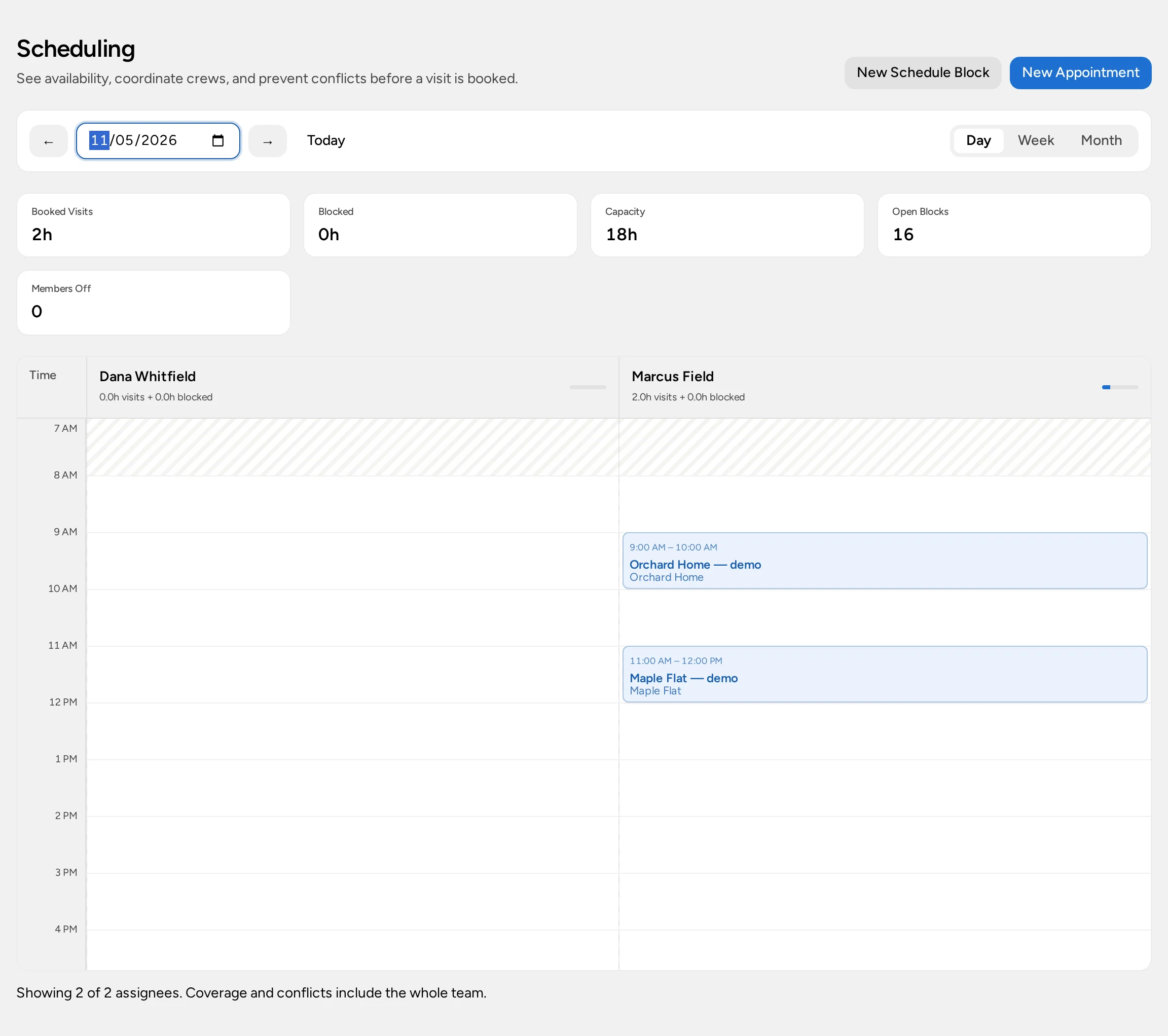
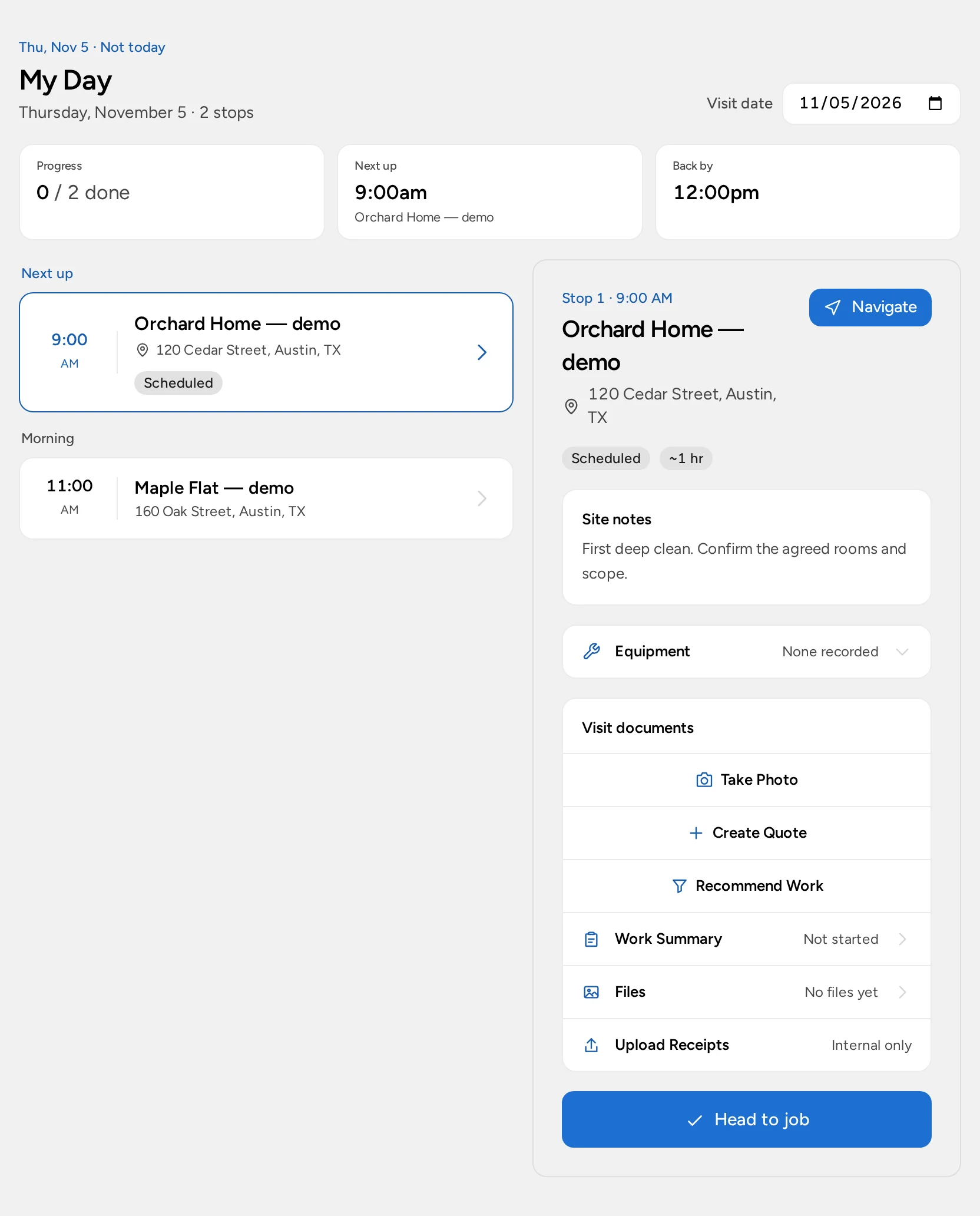
For a solo owner, My Schedule can reserve an hour to assess a property or prepare estimates. It is a personal time block, not a crew assignment. If several cleaners go to customer homes, Basic or Pro offers the Field Service add-on; an authorized dispatcher books visits at service locations and assigns staff, who see their own stops in My Day. The organization must activate that experience and grant appropriate role access. Read the scheduling guide before relying on a calendar entry as a visit.
Field Service is an optional $20/month add-on per organization on Basic or Pro. The no-card Pro trial can include Field Service. Enterprise is custom-scoped: confirm Field Service in your agreement. Your organization must select that scheduling experience, and each person's role still controls access. Compare plans.
A weekly agreement does not itself create every future visit in Opsentric. Confirm the next date and add the visits you actually intend to staff. For a move-out clean, leave room for a condition check and confirm arrival arrangements with the customer rather than assuming the saved visit notified them.
Treat a return clean as a new commitment
The first clean may reveal work that wasn’t in the original request. Before adding time or changing the price, confirm the scope with the customer. If a follow-up clean is agreed, schedule that visit explicitly and assign the people who will attend. A recurring verbal arrangement does not populate the calendar automatically, and completing today’s stop does not generate next week’s stop.
For an agreed regular clean, an organization with Field Service can use Service Plans to record the household, service location, frequency, and price. A person with invoice-management access creates or edits the plan; schedule-management access can view it. Review Needs Scheduling, then use Schedule Visit with active Field Service and scheduling access to book the next clean. Create and review the invoice separately. The plan tracks the visits owed, but it does not automatically staff appointments or charge the customer’s card. Follow the service-plan guide to choose fixed scheduling windows or a cadence based on the last actual service date.
For a team, have the dispatcher review the next visit’s address and time while the cleaner checks the assigned stop in My Day. If the visit isn’t there, check the selected date and assignment with the office instead of entering a duplicate. Confirm any changed arrival window directly with the customer; a saved internal booking alone is not proof of a message being delivered.
Bill the agreed work, not an assumed visit
Prepare a proposal when a customer must choose between a basic and deep clean, or create a quote for the agreed scope. Issue the invoice after reviewing its terms; finishing a visit doesn’t send the invoice. Check unpaid balances as part of your daily routine.
To offer card checkout, an administrator connects the organization’s Stripe account under Administration → Payments, finishes provider onboarding, and saves an active income category. This is separate from the Opsentric subscription payment. Staff with invoice access can then offer Stripe Checkout for an eligible invoice, while Card (non-Stripe terminal) only records an external charge. Set up online payments and verify provider confirmation before treating a balance as paid.
Record supplies without giving everyone ledger access
Cleaning products and equipment purchases are costs to the business, not customer payments. A cleaner can upload a receipt at the end of the day if their role includes receipt-upload access; that need not expose the full finance ledger. The office or finance manager then checks Receipts → Needs Review, including All when reviewing the team’s uploads. They compare the vendor, date, amount, and category with the file before attaching it to an expense already in Ledger or selecting Create Expense. Uploading alone doesn’t finish the bookkeeping. Follow the receipt guide for duplicates and manual review.
For a move-out job, you might buy extra supplies after the first assessment. Record that purchase once and keep the customer’s revised scope on their quote separately. Opsentric does not automatically allocate supplies to a cleaning appointment or calculate margin per home. At week’s end, review the recorded expenses and unpaid invoices together, without entering a second income transaction for an invoice payment already confirmed through checkout.
Check the first clean and its follow-up
- Add a fictional household and confirm the home where the first clean will happen. Use a separate service location when the work site differs from the billing address and Field Service is available.
- Create a lead for a deep clean with rooms, exclusions, and a callback. Check that the lead still needs a follow-up until the scope is agreed.
- Assign the first visit on Scheduling and ask the cleaner to find it in My Day; or use My Schedule for a solo owner’s personal estimate time.
- If a return clean is agreed, create that booking separately. Prepare a quote that reflects the chosen scope and send the invoice deliberately after review.
- Upload a fictional supplies receipt. Have the finance owner check whether the purchase already exists before attaching the file or creating an expense.
- Check which receipts still need review, which invoices remain unpaid, and which follow-ups are overdue with the daily routine guide. Don’t manually record a card payment while checkout confirmation is still pending.
Keep cleaning checklists, chemical-safety procedures, customer access agreements, and employment records in their appropriate processes. A customer record cannot replace them.